Context API in react js
Context API in React
The Context API lets data flow through a component tree without manually threading props through every layer in between, making it much simpler to share data across components.
Why global state management matters
"Prop drilling" is the pattern where data has to be passed from a parent down through several intermediate components just so it can reach a deeply nested child — even though those middle components never use the data themselves. As an app grows, this makes the component tree harder to follow and adds unnecessary boilerplate.
Global state tools — Context API, Redux, Zustand, and similar libraries — exist specifically to solve this.
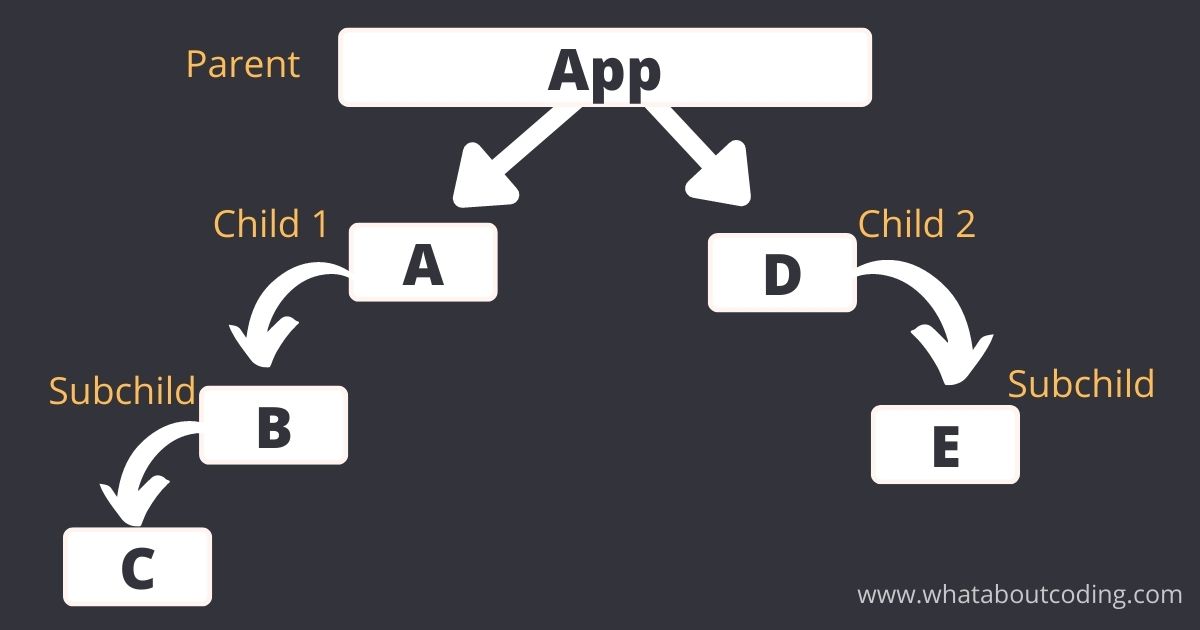
Context works in three parts:
- Create a context with React.createContext() — this produces a Context object that will hold whatever data you want to share.
- Provide it by wrapping part of your component tree in Context.Provider, passing the shared data through its value prop.
- Consume it anywhere in that subtree using the useContext hook (or the older Context.Consumer component), without needing it passed down as a prop at all.
Step 1 — Create the context object
Start with an empty context and export it so other files can use it.
src/contexts/ThemeContext.js
import { createContext } from "react";

export const ThemeContext = createContext();
Step 2 — Wrap your app with the Provider
Define the state you want to share, then hand it to the provider's value prop while wrapping the components that need access.
App.jsx
import { useState } from "react";
import { ThemeContext } from "./contexts/ThemeContext";
import A from "./A";
import B from "./B";

function App() {
  const [text, setText] = useState("");

  return (
    <ThemeContext.Provider value={{ text, setText }}>
      <A />
      <B />
    </ThemeContext.Provider>
  );
}

export default App;
Why two sets of curly braces? The outer {} is standard JSX syntax for embedding a JS expression as a prop value. The inner {} is the actual object literal being passed — in this case { text, setText }. So value={{ text, setText }} means: "embed this JS expression," where the expression happens to itself be an object.
Step 3 — Consume the context
Import the context plus the useContext hook, destructure what you need, and use it freely inside the component.
A.jsx
import React, { useContext } from "react";
import { ThemeContext } from "../contexts/ThemeContext";

const A = () => {
  const { text, setText } = useContext(ThemeContext);

  return (
    <div>
      <h1>{text}</h1>
      <button onClick={() => setText("Hello, world!")}>Click me</button>
    </div>
  );
};

export default A;
Step 4 — Clean it up with a custom provider component
Rather than managing state in App and exporting a bare context, it's common to bundle the state and provider together into their own component:
src/contexts/ThemeContext.js
import { createContext, useState } from "react";

export const ThemeContext = createContext();

export const ThemeProvider = ({ children }) => {
  const [text, setText] = useState("");

  return (
    <ThemeContext.Provider value={{ text, setText }}>
      {children}
    </ThemeContext.Provider>
  );
};
App.jsx
import { ThemeProvider } from "./contexts/ThemeContext";
import A from "./A";
import B from "./B";

function App() {
  return (
    <ThemeProvider>
      <A />
      <B />
    </ThemeProvider>
  );
}

export default App;
This keeps App clean and makes the provider reusable anywhere else it's needed.
Benefits of the Context API
- No more prop drilling — data no longer needs to pass through components that don't actually use it.
- Centralized state — a natural fit for things like themes, authentication state, or app-wide settings.
- Better readability — the component tree stays simpler since intermediate components don't need to forward unrelated props.
- Decoupling — components that share data don't need a direct parent-child relationship, making them easier to reuse independently.
- Flexibility — you can create multiple, separate contexts for different pieces of state.
- Simpler component interfaces — components in the middle of the tree keep smaller, more focused prop lists.
Conclusion
Context lets you define shared data once near the top of a tree and read it from any descendant, no matter how deep — cutting out the tedious, error-prone process of manually passing props down through every layer.