Event Loop in Javascript
In the last article, we learned about how JavaScript execution works. But that is not the complete flow. We have not taken a few properties into account, and that's why in this article we will cover all of them in detail and in-depth.
Let's start.
Understanding the problem statement
Let's have a look at the below code:
Code 1
// Code 1
console.log("start");

function func1(){
    console.log("inside function")
}

func1();
console.log("end");
Code 2
// Code 2
console.log("start");

setTimeout(function(){
    console.log("inside function")
}, 2000);

console.log("end");
The way these two codes execute in JavaScript is completely different.
Since JavaScript is a single-threaded language, execution starts from top to bottom.
- In Code 1, execution moves line by line sequentially.
- In Code 2, because setTimeout is part of the Web APIs, the execution flow changes.
Output Comparison
Code 1 Output:
Plaintext
start
inside function
end
Code 2 Output:
Plaintext
start
end
inside function
Adding event loop to the execution flow
- Step 1: As soon as the JS engine encounters the <script> tag, it creates a Global Execution Context inside the Call Stack.
- Step 2: It encounters the first log statement and prints "start".
- Step 3: It finds setTimeout. The callback of setTimeout is offloaded to the browser's Web APIs memory, and a timer of 2 seconds is attached to it.
- Step 4: Since JS engine is single-threaded, execution moves forward immediately, printing "end".
- Step 5: Once the 2-second timer finishes, the callback function is pushed to the Task Queue (specifically the Macrotask Queue), waiting for the Call Stack to empty.
- Step 6: Now comes the job of the Event Loop. Its main responsibility is to check if the Call Stack is empty. Once empty, it moves tasks from the Task Queue to the Call Stack.
- Step 7: The setTimeout callback function is pushed to the Call Stack and executed.
- Step 8: The Call Stack becomes empty, and execution ends.
Now go ahead and drink some water 🥛
Definition of all the jargons
Call Stack
Keeps track of function calls, managing their execution order and maintaining the program state.
Web APIs
APIs provided by the browser to extend functionality. Examples: HTTP/HTTPS requests, DOM API, fetch, Event Listeners, setTimeout, etc.
Task Queue / Callback Queue
Holds tasks resulting from input events, timer events, and other Web API callbacks.
Microtask Queue
Holds tasks associated with Promises. It has higher priority than the Macrotask Queue.
Examples: process.nextTick, Promises (.then, .catch), queueMicrotask, MutationObserver.
Macrotask Queue
Executes only after all tasks in the Microtask Queue are cleared. It has lower priority.
Examples: setTimeout, setInterval, setImmediate, requestAnimationFrame, I/O, UI Rendering.
Priority of the task queue
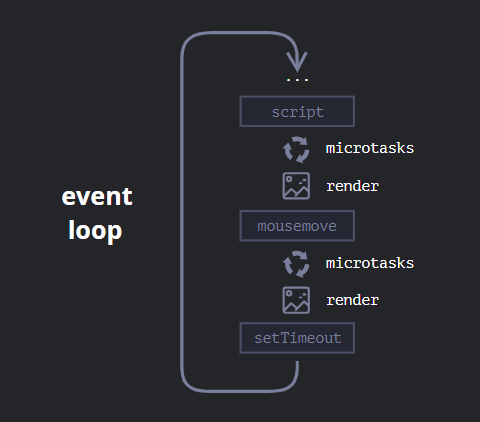
Suppose we have console.log, a Promise, an Event Listener, and a setTimeout in the execution context:
- console.log executes first, directly on the Call Stack.
- Promises (.then) execute next, as they enter the Microtask Queue (highest async priority).
- Event Listeners execute next from the Callback Queue.
- setTimeout executes last, as it belongs to the Macrotask Queue (lowest priority).
Few questions on event loop and task queue
Question 1
console.log('Start');

const delay = (ms) => new Promise(resolve => setTimeout(resolve, ms));

delay(1000).then(() => {
    console.log('Delayed function');
});

console.log('End');
Start
End
Delayed function
Explanation: "Start" logs synchronously. delay(1000) sets a 1s timer via setTimeout. "End" logs synchronously. After 1 second, the resolved Promise .then() callback executes and logs "Delayed function".
Question 2
setTimeout(function () {
    console.log(1);
}, 0);

console.log(2);

Promise.resolve().then(() => {
    console.log(3);
});

setTimeout(function () {
    console.log(4);
});

console.log(5);
Solution
2
5
3
1
4
Explanation:Synchronous logs execute first: 2, then 5.Microtask Queue executes before Macrotask Queue: Promise .then() logs 3.Macrotask Queue executes in First-In-First-Out order: setTimeout 1 logs 1, followed by setTimeout 2 logging 4.
Question 3
console.log('Start');

setTimeout(() => {
    console.log('Inside setTimeout 1');
}, 0);

new Promise((resolve, reject) => {
    console.log('Inside Promise constructor');
    resolve();
})
.then(() => {
    console.log('Inside Promise then 1');
    return new Promise((resolve, reject) => {
        console.log('Inside nested Promise constructor');
        resolve();
    });
})
.then(() => {
    console.log('Inside Promise then 2');
});

setTimeout(() => {
    console.log('Inside setTimeout 2');
}, 0);

console.log('End');
Solution
Start
Inside Promise constructor
End
Inside Promise then 1
Inside nested Promise constructor
Inside Promise then 2
Inside setTimeout 1
Inside setTimeout 2
Explanation:Synchronous execution: "Start", then the Promise constructor body executes synchronously logging "Inside Promise constructor", then "End".Microtasks: The first .then() runs logging "Inside Promise then 1", executing its nested constructor synchronously to log "Inside nested Promise constructor". The chained .then() runs immediately after as a microtask, logging "Inside Promise then 2".Macrotasks: The two setTimeout callbacks run sequentially: "Inside setTimeout 1", then "Inside setTimeout 2".